Favourite apps
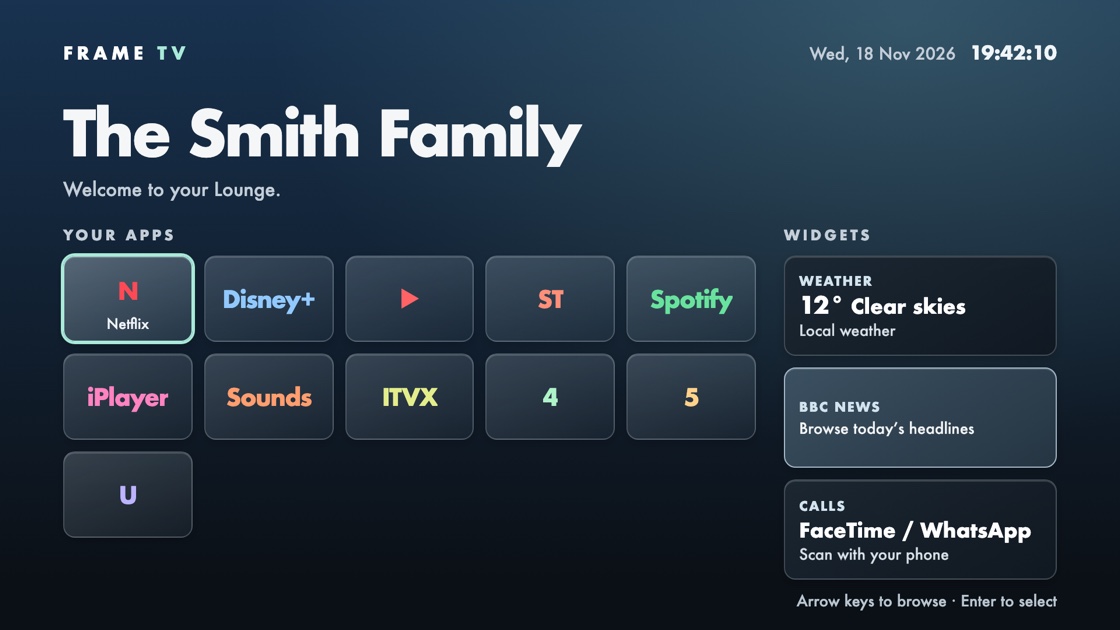
Put the streaming apps you actually use within easy reach of the remote.
MADE FOR FIRE TV
Open your favourite apps in a few remote clicks and bring your own photos to the big screen.
Request beta accessFree during the invite-only beta.
Layout preview · No live call
 Demo code opens the Jitsi guide.
THE EXPERIENCE
Put the streaming apps you actually use within easy reach of the remote.
Use your own pictures for rotating backgrounds and a full-screen screensaver.
Try colours, layouts and photos in a browser preview. Sending designs directly to the TV is planned for the beta.
PRIVATE BETA
We’re starting with a small group of testers using a Fire TV Stick 4K Max (2nd gen). The beta is free and invite-only.
Tell us which Fire TV you use. If you’re selected, we’ll email you instructions for installing the app and activating your Studio account.
Follow your Amazon beta invitation to install FRAME TV through Appstore Beta Hub. Open FRAME TV from your apps.
Sign in to Design Studio in your browser and enter the link code shown in FRAME TV on your TV.
Change your heading, background or shortcuts in Studio, then select Save design. With FRAME TV open, your changes appear on the TV. Tell us how the setup went.
Amazon beta installs are being prepared. You can request early access below.
GET EARLY ACCESS
Tell us which Fire TV you use. We’ll contact selected testers when invitations are ready.